Custom DTF Transfer
Upload your artwork, choose placement(s), set sizes & quantities, then checkout.
STEP 1
Upload your artwork
Drag & drop your file
or choose from your device
Or choose a preset design
Pick a design and continue like normal.
Tip: Clicking a preset will load it like an upload.
STEP 2
Choose placement
Select where the transfer will be printed.
Preview
Shirt color
Preview only: this on-screen preview is for general visual reference. Final print size, exact placement, garment tone, and perceived scale may appear slightly different during production and on the finished garment.
STEP 3
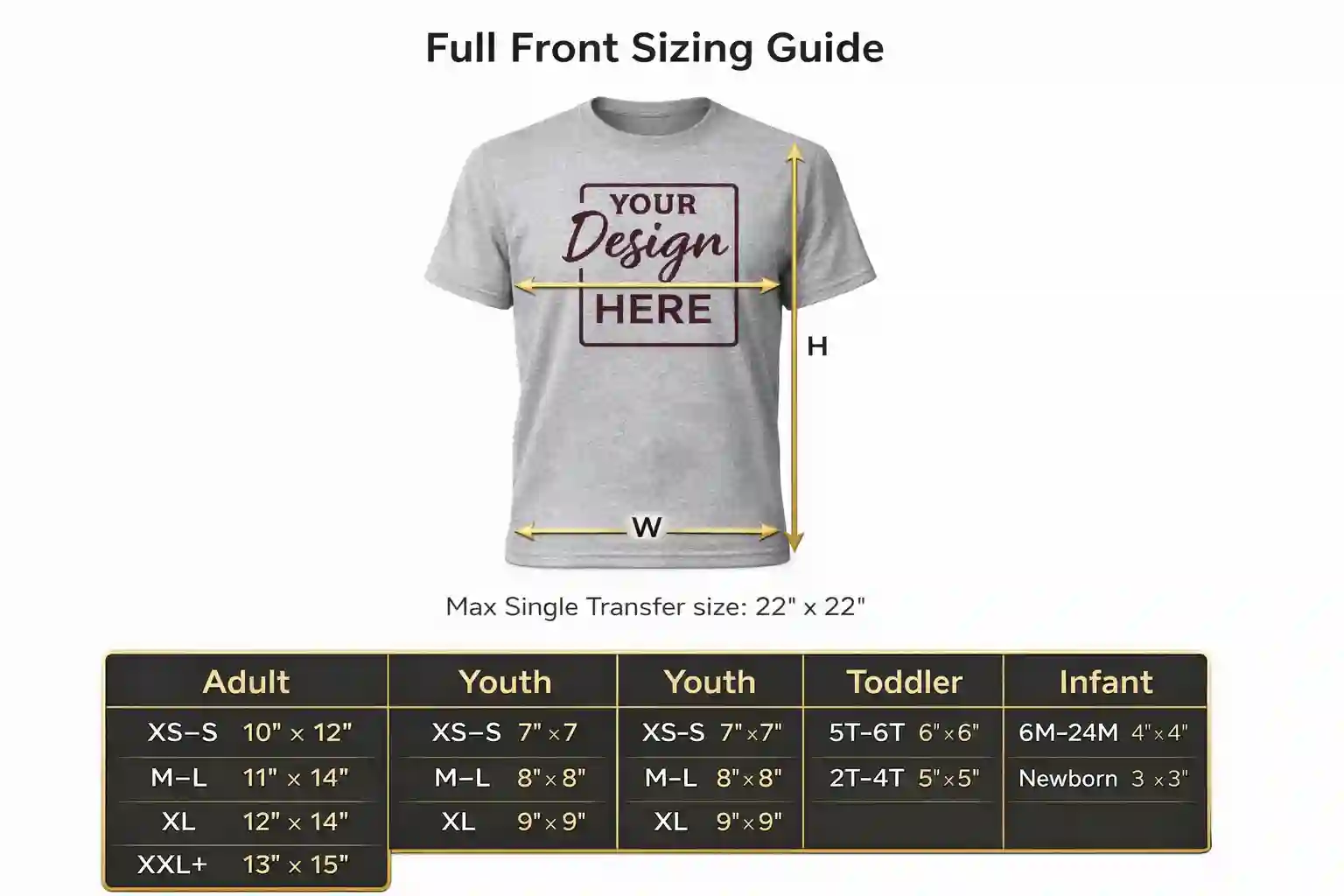
Select size & quantity
Selected preset includes fixed width and height.
Quantity Tier
—
Your Price
$—
Order Total
$—
Production-safe: customers will only choose from preset sizes. Final output is prepared using your uploaded artwork, selected placement, and approved sizing flow to help reduce ordering mistakes before production.